Skip to content
  • CAD Solutions, Blocks, 3D Models & AutoCAD Plugins

  • CAD Solutions, Blocks, 3D Models & AutoCAD Plugins

AppisCADAppisCAD
  • Menu
  • Image 3
  • 0
    Cart

    No products in the cart.

    Return to Library

  • MENU
    • Doors
      • 3D Models
      • Add-ins
      • CAD Blocks
      • Drawing Details
    • Windows
      • 3D Models
      • Add-ins
      • CAD Blocks
      • Drawing Details
    • Furniture
      • CAD Blocks
    • Animals
      • CAD Blocks
    • People
      • CAD Blocks
    • Vehicles
      • 3D Models
      • Add-ins
      • CAD Blocks
    • Information Signs – ISO 7001
      • CAD Blocks
    • Safety Signs – ISO 7010
      • CAD Blocks
    • MUTCD Signs (USA)
    • Softscape
      • CAD Blocks
  • Architecture
    • Door
    • Window
    • Wall
    • Plaster
    • Green Building
  • Civil
    • Transportation
    • Signage
  • Furniture
    • Bed
    • Chair
    • Dining Table
  • Landscape
    • Softscape
    • Urbanism
  • MEP
    • Electrical
    • Mechanical
    • Plumbing
  • Structure
    • Reinforced Concrete Structure
    • Column
    • Lintel
  • CADtools
  • MY LIBRARY
  • Login / Register
  • Cart / $0 0
    • No products in the cart.

      Return to Library

Tag Archives: drawing

Car Park, Civil, Vehicles

Vehicles CAD blocks library

Posted on May 18, 2023November 15, 2025 by Bilal Aoun
Continue reading →
Posted in Car Park, Civil, Vehicles  |  Tagged AutoCAD, Autolisp, CAD blocks, cars, drawing, dwg, Vehicles
Uncategorized

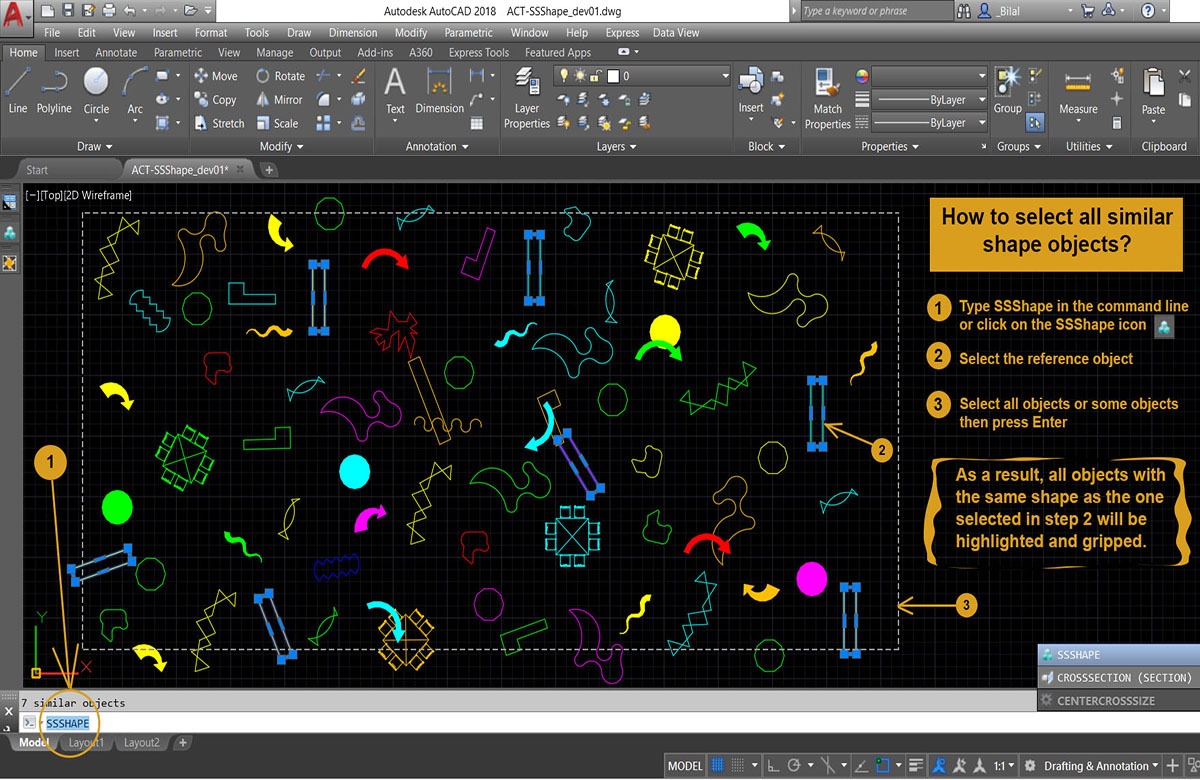
How do I select objects that have similar shape in the drawing?

Posted on December 23, 2022February 26, 2025 by Bilal Aoun
Select Similar Shape autolisp plugin
Continue reading →
Posted in Uncategorized  |  Tagged addon, AutoCAD, Autolisp, CAD, drawing, frontpage, Plugin, same shape, Select similar shape
3D Models, Autolisp, CAD Blocks, Doors

Door CAD blocks

Posted on November 5, 2022November 15, 2025 by Bilal Aoun
Door CAD blocks

Door cad blocks – free download

Continue reading →
Posted in 3D Models, Autolisp, CAD Blocks, Doors  |  Tagged AutoCAD, Autolisp, CAD blocks, Door, drawing, dwg
Uncategorized

How to automate the Wood Folding Door Drawing in AutoCAD?

Posted on December 1, 2020June 12, 2025 by Bilal Aoun
Wood Folded Door
Continue reading →
Posted in Uncategorized  |  Tagged Autolisp, Door, drawing, dwg, folded, frontpage, quantity takeoff, wood
Uncategorized

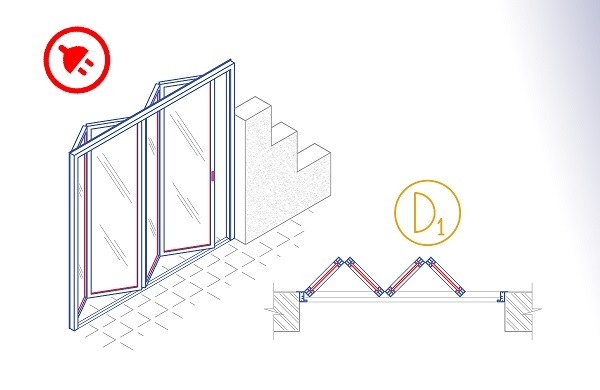
How to automate the Aluminium Folding Door Drawing in AutoCAD?

Posted on January 19, 2020June 12, 2025 by Bilal Aoun
Aluminium Folded Door is an Autolisp plugin.
Continue reading →
Posted in Uncategorized  |  Tagged 187, aluminium, AutoCAD, Autolisp, Door, drawing, dwg, folded, frontpage, quantity takeoff
  • 1
  • 2
AppisCAD

ABOUT US

CONTACT US

FOLLOW US
Our specialized software development team is making a continuous effort and persistence to develop and expand the AppisCAD's Library to ensure all users' expectations. We will inform you successively of the latest debugging and new version.
SECURITY FIRST
Your personal data used is secure.SiteLock
Your personal data will be used to process your order, support your experience throughout this website, and for other purposes described in our [Privacy_Policy]
  • Architecture
    • Door
    • Window
    • Wall
    • Plaster
    • Green Building
  • Civil
    • Transportation
    • Signage
  • Furniture
    • Bed
    • Chair
    • Dining Table
  • Landscape
    • Softscape
    • Urbanism
  • MEP
    • Electrical
    • Mechanical
    • Plumbing
  • Structure
    • Reinforced Concrete Structure
    • Column
    • Lintel
  • Login / Register
  • NEWSLETTER


    • NEED MORE INFORMATION?

      Watch video tutorials.

      https://youtu.be/iXX1CZ1FM98

    We use cookies to improve your experience.
    We use cookies to improve your experience and analyze traffic. By using our site, you agree to our Privacy Policy.
    Functional Always active
    Essential for website operation and cannot be disabled.
    Used to remember your choices, like language or location settings.
    The technical storage or access is necessary for the legitimate purpose of storing preferences that are not requested by the subscriber or user.
    Statistics
    The technical storage or access that is used exclusively for statistical purposes. Helps us improve the website by collecting anonymous usage data.
    Marketing
    Used to personalize content and show relevant advertisements.
    • Manage options
    • Manage services
    • Manage {vendor_count} vendors
    • Read more about these purposes
    View preferences
    • {title}
    • {title}
    • {title}

    Login

    Lost your password?

    Register

    A link to set a new password will be sent to your email address.

    Your personal data will be used to support your experience throughout this website, to manage access to your account, and for other purposes described in our privacy policy.