



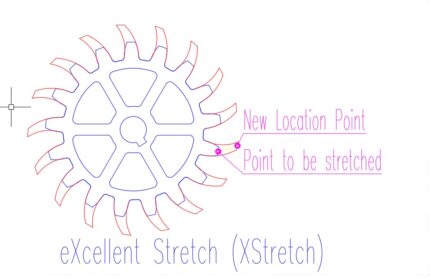
eXcellent Stretch command is an Autolisp Add-in. By stretching just one point, you can stretch all the periodic points in an object or multiple similar objects. To utilize this feature, download the MSI installation file to your computer, install it, open AutoCAD, and then input 'XStretch' into the command line to run the application.

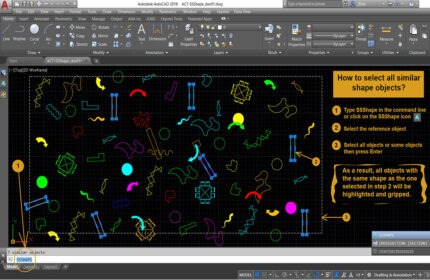
Use the Select Similar Shape AutoCAD Command (SSSHAPE) to quickly find and filter objects with the same shape in your drawings. Available on the Autodesk App Store.


The Wall Quantity Takeoff AutoLISP add-on efficiently detects varying wall thicknesses and lengths from selected polylines with just one click. This tool automates the creation of detailed quantity calculations, comprehensive schedules, and produces a complete, professional takeoff report. Support is provided for 1 month from the purchase date.
Boost Your Workflow with CAD Tools Plugins from AppisCAD
CAD Tools Plugins from AppisCAD help you work faster and with more precision inside AutoCAD. These plugins simplify daily drafting tasks and reduce repetitive actions. With just a few clicks, you can clean drawings, manage layers, and automate calculations.
Each plugin is built for practical use. You don’t need to learn new software or change your workflow. Once installed, the plugin becomes part of your existing AutoCAD interface. It feels familiar and is ready to use right away.
Our CAD Tools Plugins focus on speed and accuracy. For example, the quantity takeoff plugin helps you calculate materials in seconds. You can also use our block management tools to insert standard symbols quickly. Other tools help remove unused layers, rename objects, or fix messy files with ease.
AppisCAD designs these tools with engineers and drafters in mind. We focus on what helps you get the job done faster. Every plugin is lightweight, reliable, and works well with major AutoCAD versions. We also update tools often based on user feedback.
Whether you work in architecture, civil engineering, or MEP drafting, you’ll find tools that match your needs. These plugins improve drawing consistency, reduce manual errors, and save you hours of editing time. Many users rely on them daily to deliver better results under tight deadlines.
Explore our collection of CAD Tools Plugins and see how they can improve your workflow. Try one today and feel the difference in your next drawing session.